Kernun UTM can cooperate with the Dr.WEB or ClamAV antivirus programs
and any other antivirus program that supports ICAP protocol, e.g. Kaspersky
Anti-Virus for Proxy Server. This tutorial describes the configuration
of Kernun UTM only (that is, not the installation and configuration of the
antivirus programs). The complete configuration file is located in
/usr/local/kernun/conf/samples/cml/antivirus.cml.
The ClamAV antivirus program can be installed either directly on Kernun UTM or on any other machine connected via the network. The administrator of Kernun UTM can choose either of two ways to transport files between Kernun UTM and ClamAV:
clamav-net: Files to be checked by the antivirus are sent to the antivirus via the TCP connection.clamav-file: Files to be checked by the antivirus are stored on the local file system. This option can be only used if the antivirus program is running on the same machine as Kernun UTM. The directory where the files are stored is defined by thecomm-direlement (which defaults to/data/tmp/antivirus). Kernun UTM does not create the directory (it must be explicitly created by the administrator), and proper permissions need to be set (i.e., the directory must be writable byproxy-user).
The IP address and the port the antivirus program listens on
are specified in the section antivirus on the
system level of Kernun UTM's configuration, as
shown in Figure 5.56, “Configuration of the connection to the antivirus program” (we
suppose ClamAV listens on localhost's port 3310). It is possible
to limit the size (max-checked-size) of files
scanned by the antivirus program. In the sample configuration, it
is 1 MB. Larger files are not scanned and the antivirus module
immediately reports the result as
SKIPPED.

The Internet Content Adaptation Protocol (ICAP) is a lightweight HTTP-like protocol used to communicate with antivirus program. Kernun UTM makes use of it's Response Modification Mode to send data to be checked. Antivirus program sends back it's test results.
The IP address and the port the antivirus ICAP server listens
on are specified in the section antivirus on the
system level of Kernun UTM's configuration, as
shown in Figure 5.57, “Configuration of the connection to the antivirus program via ICAP”
(in this example it's 10.0.0.33 and standard
ICAP port, 1344). The third parameter of
connection item (/av/respmod
in this example) is an URI of the antivirus' Response Modification
Mode handler. Again, it is possible to limit the size
(max-checked-size) of files scanned
by the antivirus program.

There are five possible results of a check of content by the antivirus:
- Free
The antivirus has scanned the data and has not found any virus.
- Found
At least one virus has been found.
- Skipped
The antivirus has not scanned the data. Either the antivirus itself has decided not to scan, or the file has been larger than the limit specified by
max-checked-size. No virus has been found, but the antivirus has not confirmed that the data is virus-free.- Unknown
The proxy has received a result from the antivirus, but does not understand it. It is not known whether there is any virus in the data, or not.
- Error
The proxy cannot communicate with the antivirus. This is usually caused by the antivirus not running or by misconfigured antivirus connection in the proxy.
The antivirus program can be used for online scanning of the
content transferred via ftp-proxy,
http-proxy, imap4-proxy,
pop3-proxy and smtp-proxy. There is a
slight difference between mail-processing proxies
(imap4-proxy, pop3-proxy and
smtp-proxy) and the other two
(http-proxy and ftp-proxy). In the
latter case, a special functionality is implemented that prevents clients
from reaching a timeout while very long files are being scanned. The
client is fed with chunks of the file at specified intervals until the
scanning of the file is completed.
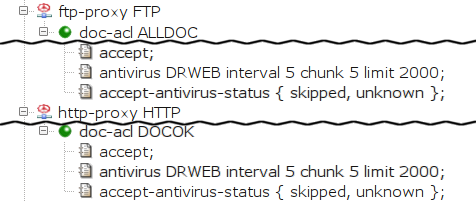
Document scanning for the HTTP and FTP proxies is configured in
their doc-acl. The antivirus item
specifies the name of the antivirus section to be used.
The interval, chunk and
limit items can be used optionally to specify that
if scanning takes more than a certain time (5 seconds in the example),
a chunk of the (as yet unscanned) file of a certain size (up to 2,000 bytes)
is to be sent to the client at a certain interval (5 seconds). By default,
only documents for which the antivirus returns the result
free are passed by the proxy. The
doc-acl.accept-antivirus-status item can be used to specify
additional result codes, for which the checked data are to be passed, in
addition to free.
We will describe two variants of smtp-proxy
configuration, differing in the way they handle
infected mail. In this section, we show the case
when infected mail is discarded, i.e. not sent to the
recipient(s), but stored in quarantine.
In smtp-proxy, the item
use-antivirus is used to define antivirus.
Infected mail is detected in the mail-acl
sections. One of them, a mail-acl accepting all
e-mails (MAILOK), already exists in the
Kernun UTM configuration. We will create more to process messages
with various antivirus scan results (see Figure 5.59, “Discarding infected messages in the SMTP proxy”).
When smtp-proxy processes mail, the first
matching ACL is used. We must therefore place new
mail-acl sections before the existing
MAILOK.
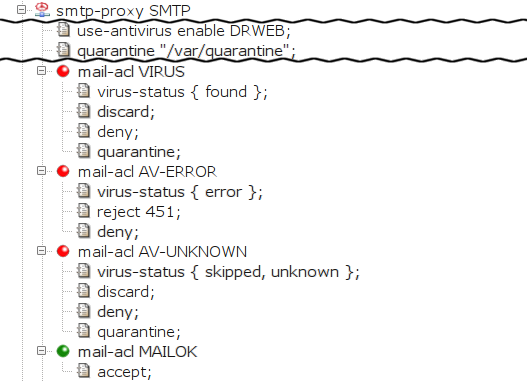
The first added mail-acl,
VIRUS, discards infected mail
and puts it in quarantine. Its only entry condition is
virus-status. It is matched if the
virus-status of the message is
found (i.e., it contains a document that
is infected by a virus). We define three actions:
discard the message (i.e., the sender
is not returned an error), deny it
(the message is not sent to the addressee) and store the
e-mail in quarantine.
The quarantine directory must be defined (the
quarantine item in the
smtp-proxy section) and created in the file
system (e.g.,
/usr/local/kernun/root/var/quarantine,
keeping in mind the smtp-proxy runs in
chroot), and writable by kernun-user. For more
information about ways of handling mail stored in quarantine,
see quarc.sh(1).
There are two more mail-acl sections.
AV-ERROR reports a transient error to the client if
the the antivirus is unable to check the message. The client can retry
sending the mail later. AV-UNKNOWN discards and
quarantines the message if the antivirus does not scan it or if the
proxy cannot understand the antivirus' reply.
Contrary to the previous example, this section
describes a way to prevent infected mail from being discarded.
This example refers to smtp-proxy SMTP-2,
which is marked hidden in the sample file[36].
This time,
smtp-proxy removes the infected documents from
the message and delivers the e-mail to the addressee, sending a BCC copy to
a special (administrator's) e-mail
address. Moreover, the subject is changed to make it obvious that a
virus was removed from the message.
smtp-proxy also stores infected mail in
quarantine. The configuration is depicted in Figure 5.60, “Replacing infected documents in the SMTP proxy”
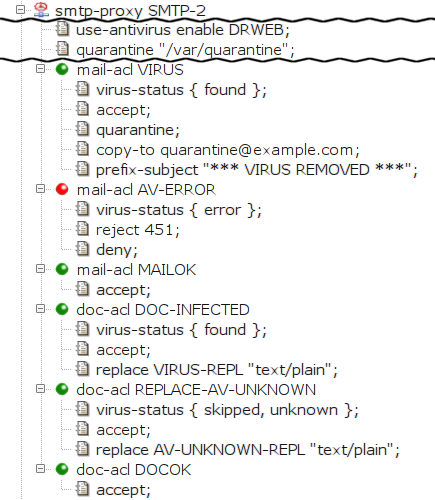
The removal of infected document is ensured by creating a
special doc-acl DOC-INFECTED section that matches
the infected documents. We place it in front of the existing
doc-acl DOCOK in order to match before the
more generic doc-acl DOCOK. The entry condition
virus-status found limits the acl
scope to the infected documents (documents marked by the
antivirus program as containing a virus). We add the action item
replace so that the matched (and therefore
infected) document is replaced by the given file. The
administrator must explicitly create this file if it does
not exist. Because the proxy is configured to run in chroot
environment, the file must be stored in the particular
subdirectory of the directory specified as
chroot-dir (in this case,
/usr/local/kernun/root/etc/shared/error_documents/).
The special behavior for infected e-mails (i.e., the
messages that contain an infected document) is defined in
mail-acl VIRUS. The entry condition
virus-status found limits the acl scope to
infected e-mails. The accept item specifies
that the e-mail should be delivered to the addressee. We specify that
the message is to be stored in the quarantine, that a BCC copy be sent to a
special e-mail address (the copy-to item) and that
the subject be prefixed with a specified text (the
prefix-subject item).
Like in SMTP, there is an additional
mail-acl AV-ERROR that returns a transient error
to the client if the mail cannot be checked by the antivirus.
Finally, doc-acl REPLACE-AV-UNKNOWN replaces
documents that are skipped by the antivirus.
In this section, we show the POP3 and the IMAP4 proxies configured to replace infected documents. See the Figure 5.61, “Replacing infected documents in the POP3 proxy” and Figure 5.62, “Replacing infected documents in the IMAP4 proxy”
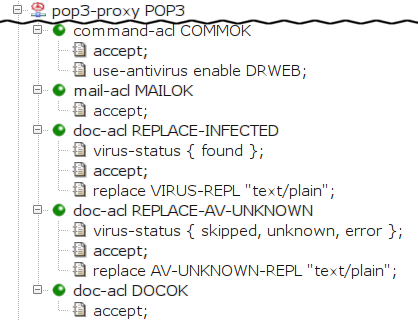
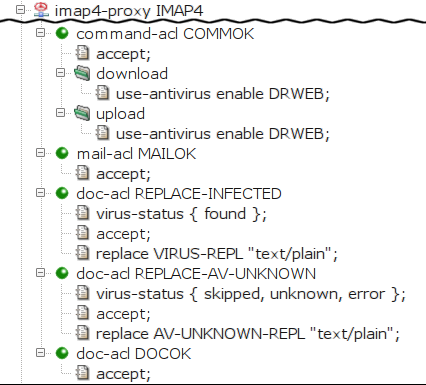
First, we instruct Kernun UTM to scan the documents transferred
through the proxy with the antivirus by specifying
the item use-antivirus. The item is specified
directly in command-acl for the POP3 proxy, whereas
for IMAP4 proxy, it is specified separately for the
download and for the upload
case.
In the second-level acl (mail-acl MAILOK), we
specify that all e-mails should be accepted. In the third-level
acl, we specify that we want to replace infected
(doc-acl REPLACE-INFECTED) and unscanned
(doc-acl REPLACE-AV-UNKNOWN) documents, and to accept
all other documents (DOCOK)[37].