Kernun UTM provides module Adaptive Firewall that detects and blocks suspicious traffic.
According to the configuration, it can either detect and log suspicious network traffic (in IDS mode), or also block it (in IPS mode). For detailed description of the IDS/IPS system, see adaptive-firewall(7) and ips(7).
An example of Adaptive Firewall configuration is shown in Figure 5.83, “Adaptive Firewall”. The complete sample
configuration is available in the /usr/local/kernun/conf/samples/cml/ids.cml file.
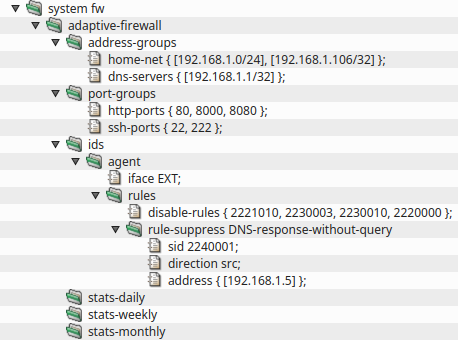
Adaptive Firewall consists of two parts, ids and ips. IDS is composed of
several possible detectors, agent, honeypot and watchdog.
Both IDS and IPS have their own databases that contain detected IP addresses (in case of IDS) or blocked IP
addresses (in case of IPS).
IDS agent is an application that performs advanced inspection of network traffic by using
complex rules downloaded from a central server to monitor traffic on interfaces specified by item
iface. The rules are configured in section
system.adaptive-firewall.ids.agent.rules while the rules download is configured in section
system.update. IDS agent uses configuration file
samples/shared/ids-agent.yaml by default. It is possible to provide a custom configuration
file by specifying a shared-file agent.engine-cfg-file. Note that the file is processed by
Kernun to propagate CML configuration, namely it adds logging, specified interfaces and path to the downloaded
rules.
Honeypot is a detector that listens on given IP address that is not used for any other
purpose. A client that tries to connect to this IP address is assumed to be an attacker and is reported to
the IPS part of Adaptive Firewall.
Watchdog is a detector that monitors given files for occurences of given string patterns. It
can be used for example to detect attackers that are trying to brute-force an SSH autentication. Configuration
of this scenario can be seen in samples/include/sshd-watchdog.cml
IPS is enabled by the presence of section adaptive-firewall.ips. When enabled, the IP
addresses reported by various IDS detectors are blocked by packet filter. Every minute, IPS decides which
addresses to add from the IDS database to the IPS database and which addresses to remove from the IPS database
because they were not seen for a long enough time, which can be controlled by item
record-lifetime.
In order to increase the success rate of rules, it is possible to tell the IDS agent more about the network it
is operating in. Sections agent.address-groups and agent.port-groups are
designed for this purpose. Most rules refer to variables that can be defined here.
Traffic analysis is based on rules that describe suspicious traffic. It is desirable to update the rules
regularly. An automatic rule download system is available in Kernun UTM. This option can be configured with the
rules-download section, which describes the rules download policy. By default, it is
enabled and it uses Kernun rules. Use item schedule to define the update schedule. Item
source defines the source of the rules. More items can be specified in order to finetune
the rules download.
If you are using Kernun rules, it is highly recommended to enable feedback-upload to send
the feedback containing matched rules back to Kernun server. The matched rules are used to improve the
Kernun rules database in order to achieve high success rate of the IPS module.
Even though the rules provided by Kernun are thoroughly tested to eliminate false positive matches, they can
still happen. Therefore, the administrator can modify the downloaded rules by items in the
rules section. It is also possible add custom rules by specifying items
add-rule or include-rules.
A rule that is distributed as disabled can be enabled by item enable-rules. A disabled rule
is commented out in the downloaded rule file so the IPS engine would otherwise ignore it.
When disabling a rule, the administrator has more options. A rule can be disabled unconditionally by item
disable-rule or only for certain IP addresses by item rule-suppress. It is
also possible to disable all rules for certain IP addresses by item global-suppress.
In IPS mode, it is sometimes desired to change the rule action from alert to
drop or reject. This can be done by items
change-rules-to-drop and change-rules-to-reject.
Items rule-rate-filter and global-rate-filter can be used to change the
rule action after the rule matched a certain number of times within a specified time frame. Similarly, items
rule-threshold and global-threshold alter the rule so it is applied only
after it matches a certain number of times within a specified time frame.
When the above methods are not sufficient, it is also possible to modify a certain rule by providing a
regular expression and a replacement string in item modify-rules.